Navigation, Receiver & Antenna Guide
Set up the Receiver and three Antennas correctly, then use coordinates to navigate to large and story locations.
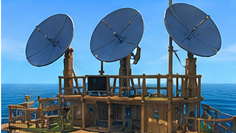
← Raft Guide Hub · Progression Route · Resources
Required equipment
A working setup includes one Receiver, three Antennas and a powered battery. The Receiver recipe requires 8 Planks, 6 Plastic, 2 Circuit Boards and 1 Hinge; build the Antennas separately from their own ingredient requirements. Research circuit boards and the Receiver components first.
Placement rules
Put the Receiver on a suitable elevated platform and place all three Antennas with adequate distance from one another and from the Receiver. If an antenna is too close or the elevation is wrong, the screen displays a warning. Reposition the equipment based on that warning until all three antennas are functioning.
Reading the radar
The screen displays radar contacts and a selected four-digit frequency. The first story signal leads to Radio Tower. New story codes are learned at successive destinations, recorded in your notebook and entered using the Receiver controls. Blue story targets and green ordinary contacts represent different kinds of destination.
Follow the target
Orient the raft and watch how the marker moves relative to the Receiver screen. A sail can handle early drift and course changes, but you later need Engine and Steering Wheel technology for destinations against the current. Recheck the radar as you travel instead of assuming one heading will remain accurate all the way.
Saving batteries
Turn off the Receiver whenever you are not actively navigating. A drained battery is a common reason the system seems broken. Prepare charged spare batteries for long trips or establish the Battery Charger when it becomes available.
Troubleshooting checklist
No power: replace or charge the battery. Antenna warning: correct height and separation. Wrong destination: check the four-digit notebook code. Blue target behind you: adjust your heading and propulsion. Can't progress: finish the previous location and collect the next code rather than relying on numbers published online.
Antenna checklist
If the Receiver warns that an antenna is misplaced, do not move all three at once. Adjust one and check the display, then repeat until all warnings are cleared. Keep the Receiver and Antennas unobstructed by later construction. Leave the screen switched off while crafting or decorating to preserve the battery.
Receiver setup checklist
| Symptom | Likely cause | Next action |
|---|---|---|
| Screen is dark | No battery or depleted battery | Fit a charged Simple or Advanced Battery |
| Screen reports antenna error | Antennas too close or incorrect elevation | Move one antenna at a time, respecting spacing and height |
| No blue objective appears | Incorrect story frequency or code not collected | Open your journal and enter the code learned at the previous location |
| Destination is behind the raft | Course or raft rotation | Turn with sail or powered steering, then check radar again |
| Receiver works but raft makes no headway | Current or insufficient propulsion | Use Engine and Steering Wheel after Vasagatan |
Plan a journey without wasting battery
Switch the Receiver on to find a heading, note the marker position, then turn it off while sailing on a steady course. Recheck occasionally as the distance closes or currents affect the route. The first target is Radio Tower. Completing each story location unlocks the next coordinates, so the eight-location route is sequential rather than an open list of freely selectable destinations.